GOTTA CANCEL???

Of course we are sorry to see you go,
but we hope to see you back here very soon.

HOW DO I CANCEL???

1. You go to the same page you joined on.
It is called join.html.
Go there by clicking on the join button in the navigator.
Then click on Chelsea in the Tub. It looks like this.

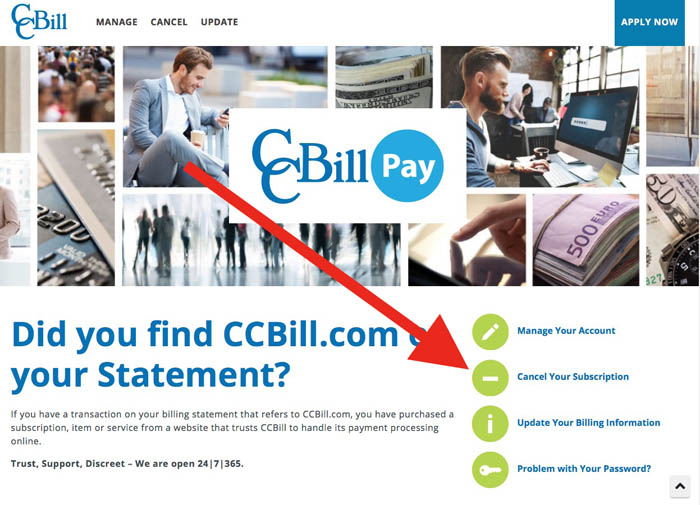
Then you will be taken to the ccbill index page.
It is the page from which you can join or cancel.
It looks like th
is: You were here when you joined,
unless your mom got you a membership for
your birthday.

If you paid by credit card, click on
CUSTOMER SUPPORT under CREDIT CARD.

If you paid by online check click on
CUSTOMER SUPPORT under ONLINE CHECK.

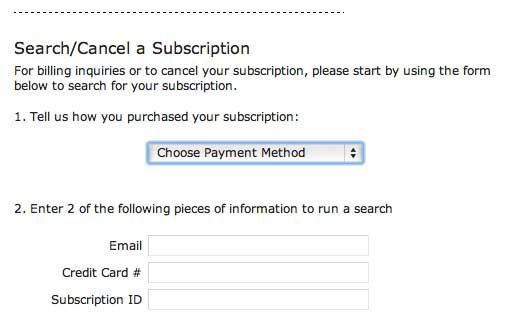
Doing so will bring you to this page.

3. For secure identification you will need
to fill in TWO of the THREE identifiers:

* the email you used when you signed up

* the credit card number you used when you signed up

* the subscription number that was given you


Once you have provided this information
Click the Search Button. You will be taken to
your membership page. From here you can
choose the cancel option.


Of course if you just can't seem to make this work,
your friendly webmaster will be happy to help you out.
Do NOT send your credit card number.
What I really need to know is your UserName.

EMAIL THE WEBMASTER